
Most beginner portfolios fail not because of lack of skill, but because of misaligned scope. They either simulate senior-level complexity or present polished surfaces without visible reasoning.
If you are shaping ux case studies, you need clarity on three points:
- how detailed should a UX case study be at your level,
- how many case studies in UX portfolio are realistically expected,
- and how to position your work if your UX portfolio shows no experience and includes mostly course or speculative projects.
The goal is not to inflate your work. The goal is to present an entry level UX portfolio that communicates readiness for the next step.
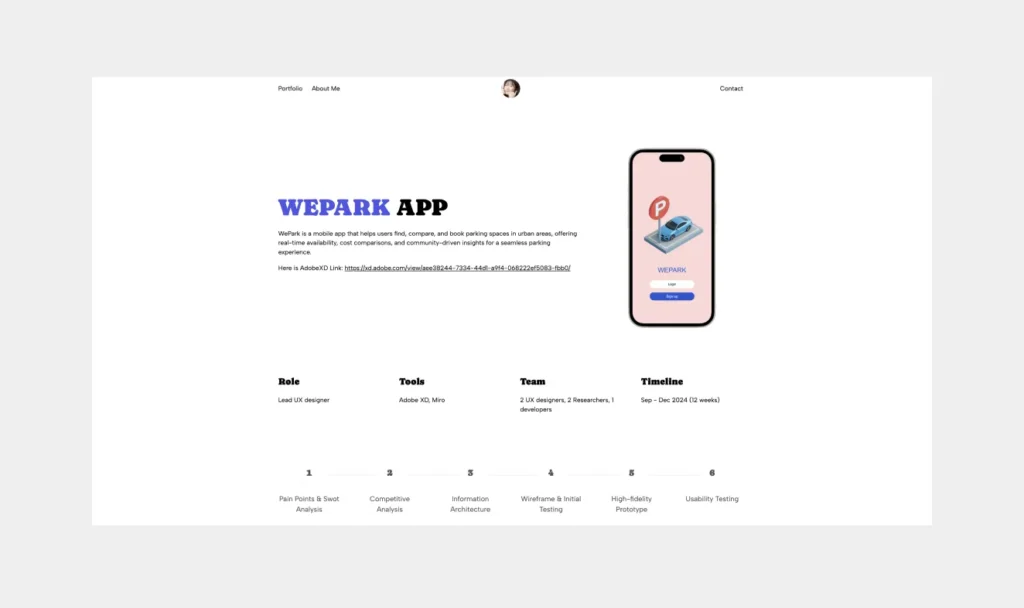
Page content
- Why UX case studies matter (especially for beginners)
- What makes a good UX case study (beyond screens)
- Choosing the right scope as a beginner
- How detailed should your UX case study be
- How many case studies do you need in your portfolio
- Examples and mini-templates for beginners
- Common mistakes beginners make (and how to avoid them)
- Final checklist before publishing your case study
- Frequently asked questions
Why UX case studies matter (especially for beginners)
For beginner UX designers, case studies are the primary tool to communicate thinking, not just visual output. Recruiters and hiring managers often cannot infer your problem-solving skills from a few polished screens. A well-crafted case study shows your reasoning, approach to user research, and how you translated insights into design decisions.
Early in your career, every case study is a learning opportunity that also signals potential, so understanding why they matter sets the foundation for making strategic choices about scope and detail.
Recruiter expectations vs reality
Recruiters reviewing entry-level UX portfolios expect clarity and structured thinking more than finished visuals. A common pattern in junior portfolios is screen density without decision context.
Recruiters want to see how you approached challenges, why you made specific design choices, and what you learned along the way. Even a single, well-articulated project can outperform multiple superficial ones.
Example: A beginner who documents a course project, emphasizing research insights and decision-making steps, can convey stronger potential than someone with three visually attractive but context-light projects.
Common pitfalls for entry-level portfolios
Beginners often fall into predictable traps that undermine their case studies:
- Focusing on screens over process: Highlighting UI design without explaining decisions leaves recruiters guessing.
- Skipping context: Presenting a feature or flow without describing the user problem or constraints weakens clarity.
- Overloading with irrelevant details: Including every mockup or wireframe can dilute the key insights.
Instead, prioritize a narrative that balances problem framing, user insights, and clear design decisions. Even with limited real-world experience, a structured, thoughtful approach signals readiness and professionalism.
Your portfolio is not just a website. It is your entry ticket to interviews. UXfolio helps you move from scattered projects to a cohesive, job-ready UX portfolio.
What makes a good UX case study (beyond screens)
A strong UX case study goes far beyond presenting polished screens or flows. For beginner designers, it’s your opportunity to demonstrate how you think, how you approach problems, and how you translate insights into actionable solutions.
Problem definition and context
Every compelling case study starts by framing the problem clearly. You need to explain the challenge, the users affected, and any constraints you faced. For a beginner, this might mean describing a course assignment or a personal project: define what the project was aiming to solve and why it mattered. Context helps the reader understand the relevance of your design decisions.
User research and insights
At a beginner level, showing that you engaged with users or conducted research, even small-scale surveys, interviews, or usability tests, demonstrates empathy and evidence-based thinking. The insights you extract should directly inform your design decisions.
Design process with clear decisions
Recruiters want to understand your reasoning. Map out your design process: how you iterated from initial sketches or wireframes to higher-fidelity prototypes. Explain why you chose certain interactions, layouts, or features over others. Avoid showing designs in isolation, each element should have a rationale linked to research or constraints.
Metrics, outcomes, and next steps
Beginner projects, including outcomes, like usability test results, engagement improvements, or lessons learned, provides measurable evidence of impact. If formal metrics aren’t available, qualitative insights or reflections on what you would do differently demonstrate critical thinking and growth.
A strong case study is structured judgment, not a gallery. If you want predefined sections that guide problem framing, research articulation, and decision clarity without restricting your design freedom, UXfolio gives you that foundation.
Choosing the right scope as a beginner
Defining the scope of your case study is critical. You need to balance ambition with feasibility, ensuring your project is deep enough to show process and reasoning but manageable within your experience level. Scope decisions also signal to recruiters that you understand project context, constraints, and priorities.
Real client project vs course assignment
Working on a real client project gives you authentic constraints, stakeholder feedback, and measurable impact. However, many beginner designers start with course assignments, which are equally valuable if framed properly. Clearly explain the assignment’s goals, constraints, and target users to provide context. Highlighting how you applied UX principles, even in a simulated environment shows maturity in thinking.
Personal projects and redesigns
Personal projects allow you to explore ideas beyond assignments. Choosing projects that align with your interests can also demonstrate passion and initiative. For redesigns, show what problems existed, how you approached solving them, and the results of your changes. Document your process as thoroughly as you would for any real project, emphasizing decisions over final visuals.
Speculative vs real-world scenarios
Speculative projects let you explore “what-if” scenarios, but they require careful framing. Clarify that the project is speculative, explain assumptions, and highlight how your decisions would apply in a real context. Recruiters value honesty and clarity in scope. Speculative work can show creativity but must remain grounded in user-centered reasoning.
Tradeoffs: depth vs quantity
As a beginner, prioritize depth over quantity. A single, well-documented case study demonstrating thorough research, clear decision-making, and measurable outcomes is more impactful than multiple shallow projects. Recruiters look for evidence of process thinking and problem-solving, not just visual polish or volume.
If you don’t have production metrics yet, that’s fine. What matters is structured presentation. UXfolio gives you flexible sections for context, constraints, and reflection, without forcing inflated claims.
How detailed should your UX case study be
Determining the level of detail in a beginner UX case study can feel tricky, but the key is clarity and relevance. You want to give recruiters and peers insight into your thinking without overwhelming them with every minor step.
Think of your case study as a narrative that guides someone through your process, showing decisions, challenges, and outcomes. For beginners, this often means being selective, deliberate, and transparent about what you include.
Minimum required elements list
At a bare minimum, your case study should include:
- Problem definition and context: Clearly describe what problem you were solving, who the users are, and any constraints.
- Research insights: Summarize key findings from user research, surveys, or competitor analysis that influenced your decisions.
- Design process overview: Show sketches, wireframes, or prototypes while highlighting why you made certain choices.
- Outcome or reflection: Include metrics, feedback, or lessons learned. Even speculative results are valuable if you explain your rationale.
Practical note for beginners: You don’t need polished visuals or extensive prototypes to communicate the process. Focus on explaining your reasoning in a way that’s accessible and professional.
Optional advanced elements
Once the minimum is solid, you can add depth to your case study with advanced elements:
- Journey maps or personas: Illustrate user behaviors and motivations to show empathy and analysis skills.
- Iterative exploration: Highlight multiple design iterations and why you refined concepts.
- Accessibility considerations: Explain how you addressed inclusivity or usability for diverse users.
- Collaboration notes: If you worked with others, briefly note your contributions versus group decisions.
These elements aren’t required for a beginner portfolio but can elevate your case study, showing maturity in thinking and process documentation.
When to stop polishing and publish
Perfectionism can stall junior UX designers. Remember, a case study’s value comes from insight, not glossy visuals. Stop when:
- Your decisions are clearly communicated.
- The story flows logically from problem to outcome.
- You have evidence of thinking and impact.
Publishing at the right moment allows recruiters to see your current capabilities while you continue learning. Iteration happens on your projects and on the case studies themselves. Updating a case study over time is often more impressive than endlessly perfecting one before sharing.
If you are unsure how much detail is enough, structured templates reduce over-explaining and under-explaining at the same time. UXfolio’s case study sections guide you toward decision-focused clarity.
How many case studies do you need in your portfolio
At junior stage, your portfolio is not a catalogue of everything you have ever designed. It is a curated argument about your potential. Each case study is evidence. The number only matters in relation to clarity, depth, and signal density.
When recruiters review entry level UX portfolios, they are rarely looking for volume. They are scanning for patterns: Do you consistently define problems well? Do you connect research to decisions? Do you understand constraints? A portfolio with five inconsistent projects raises more doubt than one with three coherent, well-reasoned case studies.
The real question becomes: how many case studies in UX portfolio are necessary to demonstrate range without sacrificing depth?
Recruiter benchmarks
In most junior hiring contexts, two to four strong case studies are sufficient. That range allows you to demonstrate:
- An end-to-end process on at least one project
- Depth in a specific area, such as research or interaction design
- Adaptability across different contexts or constraints
From a recruiter’s perspective, the evaluation process is pragmatic. They typically scan the first project in detail. If it shows structured thinking and credible scope management, they may explore one or two more to confirm consistency.
Quality over quantity rationale
At beginner level, depth compounds. Every additional weak case study dilutes the credibility of the strong ones. Don’t forget, your portfolio is judged as a system.
Quality in this context means:
- Clearly framed problems
- Explicitly stated constraints
- Visible decision logic
- Honest reflection on limitations
Instead of asking how many case studies in UX portfolio you need, ask yourself: Does each project demonstrate a distinct competency? The number is secondary. The cohesion is primary.
Tip: If you have two case studies that clearly demonstrate problem framing, research-informed decisions, and thoughtful iteration, you are within a credible range for junior applications. Additional projects should only be added if they elevate the overall signal, not simply increase the count.
Before adding another project, refine the ones you have. With UXfolio, you can iterate on your case studies quickly, test different narratives, and optimize structure without redesigning everything from scratch.
Examples and mini-templates for beginners
At beginner level, structure is leverage. When you are still building confidence and experience, a clear case study framework prevents you from drifting into visual showcase mode or process inflation.
Templates are not creative limitations. They are a clear structure to guide your thinking. They help you focus on what matters: problem clarity, decision logic, and outcome awareness.
Below are three practical mini-templates tailored to typical junior scenarios. Each reflects a different project origin, because context shapes how your case study should be framed.
Course project case study
Course projects are often underestimated. In reality, they are controlled environments that allow you to demonstrate disciplined process thinking. The key is transparency and consistency.
Suggested structure:
- Context and brief
Explain the assignment constraints. What was the original problem statement? What limitations did the course impose? Timeline? Tools? - Problem reframing
Show how you interpreted the brief. Did you narrow the scope? Did you redefine the user group? - Research and insights
Even if the research was limited, extract concrete insights. Avoid vague statements such as “users need simplicity.” Show what specifically created friction. - Design decisions
Walk through one or two critical design pivots. Why did you change direction? What insight triggered it? - Evaluation and reflection
What worked? What would you validate further in a real-world environment?
Example: If you redesigned a university library app, do not simply present improved navigation. Explain how user interviews revealed difficulty locating digital resources, and how that insight led to restructuring the information architecture.
Speculative redesign case study
Speculative redesigns are common when you have limited professional exposure. The risk is that they become aesthetic upgrades. To avoid that, your redesign must begin with the diagnosis.
Suggested structure:
- Why this product?
What motivated the redesign? Personal frustration? Market gap? - Problem validation
Use secondary research, app store reviews, or heuristic analysis to justify that the problem exists. - Hypothesis formation
Clearly articulate what you believe is broken and why. - Design intervention
Show how your redesign addresses the diagnosed issue, not just visual inconsistencies. - Validation roadmap
Since you likely lack real metrics, describe how you would test your assumptions.
Example: If you redesign a food delivery checkout flow, show friction points such as hidden fees or unclear confirmation states. Then demonstrate how your revised interaction reduces cognitive load. This structure elevates speculative work from “UI refresh” to structured UX reasoning.
For many designers without UX portfolio experience in production environments, this approach creates credibility through analytical depth.
UX research-focused case study
A research-heavy case study can differentiate you strongly at beginner level, especially if most applicants emphasize interface polish.
Suggested structure:
- Research objective
What decision was the research meant to inform? - Methodology
Who did you speak to? Why that sample? What limitations existed? - Insight synthesis
Show clustering, patterns, or thematic findings. Avoid raw data dumps. - Design implications
Translate insights into clear design directions. - Strategic next steps
What would be tested or built next?
Example: If you research onboarding challenges in a budgeting app, highlight patterns such as “users abandon during account linking due to trust concerns,” then show how that insight shaped your onboarding redesign.
Why templates matter strategically
UX case studies for beginners can be definitely tricky, templates reduce the risk of two extremes:
- Overcomplication: where you simulate senior-level complexity.
- Oversimplification: where you showcase screens without reasoning.
They also improve consistency across your entry level UX portfolio. When each case study follows a coherent structure, recruiters can evaluate your thinking efficiently. Structure is not about rigidity. It is about cognitive clarity.
If you want to structure your case study without second-guessing every section, using a purpose-built UX portfolio builder can remove friction. UXfolio helps you apply recruiter-aligned structure while keeping full control over your narrative and design.
Common mistakes beginners make (and how to avoid them)
At beginner level, most portfolio weaknesses are not about talent. They are about calibration.
You might have strong instincts, decent visual skills, and a solid understanding of the UX process. Yet your case study still feels flat. Not because you lack ability, but because the signal is buried.
This section is not about repeating generic advice. It is about identifying structural mistakes that specifically weaken UX case studies for beginners and reframing them into correctable patterns.
Too much focus on screens
Screens are tangible. They feel like proof of work. That is why many junior UX designers let them dominate the case study. The problem is not showing screens. The problem is letting visuals replace reasoning.
When a recruiter scrolls through a junior UX case study and sees hero image, high-fidelity mockups and polished UI components without clear explanation of problem definition or decision logic, the implicit message is: design as decoration.
To correct this, invert the hierarchy. Instead of structuring your case study as:
Problem – Process steps – Screens
Structure it as:
Problem – Insight – Decision – Screen as evidence
The screen becomes proof of reasoning, not the centerpiece.
Example: If you redesigned an onboarding flow, do not lead with the final UI. Start with the friction you observed, such as abandonment during account creation. Then show how that insight led to reducing required fields. The UI is the consequence, not the argument.
This shift dramatically strengthens a junior UX case study.
Not explaining decisions
Many beginner portfolios describe actions instead of decisions. “I created wireframes, I conducted interviews, I designed a new navigation.”
These statements show activity, not thinking. Recruiters are evaluating judgment. They want to understand tradeoffs.
Every significant design move implies alternatives. If you chose progressive disclosure instead of showing everything at once, why? If you simplified navigation, what complexity did you remove and at what cost? In order to fix this, introduce “micro-justifications” throughout your case study.
Example: Instead of writing: “I redesigned the dashboard.”
Write: “User interviews revealed difficulty prioritizing tasks. I replaced the grid layout with a single-column hierarchy to guide attention toward urgent items first.”
Detail is not about more artifacts. It is about exposing the reasoning layer.
Missing context and impact
A case study without context feels detached, and without impact, it feels incomplete. Readers need to understand where the project came from, what constraints shaped it, and what changed because of your work. Was it a course assignment, a speculative redesign, or a real client engagement? What limitations influenced your decisions?
Many entry-level portfolios stop at the final prototype, leaving the outcome implied rather than articulated. Even without production metrics, you can clarify impact through usability findings, qualitative feedback, or clearly defined success metrics you would track next.
If testing showed users completed a flow with fewer errors or greater confidence, state it. If the project was speculative, explain how you would measure success in a live environment.
Context anchors the work in reality. Impact demonstrates forward thinking. Together, they complete the story.
Why these mistakes matter structurally
These issues are not cosmetic, they shape how your competence is interpreted. An overload of screens signals visual bias. A lack of explicit decisions suggests a process without judgment. Missing context implies weak understanding of constraints.
Addressing these weaknesses often strengthens a portfolio more than adding another project. Recruiters infer capability from the clarity of your reasoning, not the volume of your output.
Most beginner portfolios don’t fail because of bad design. They fail because the thinking is buried. UXfolio’s case study layouts are designed to foreground reasoning, not just screens, so your decisions stay visible.
Final checklist before publishing your case study
Before publishing: Pause and read your case study as if you were the recruiter. The difference between an average and a strong beginner portfolio rarely comes from adding more content. It comes from sharpening what is already there.
Start with the problem: Can you describe it in one clear sentence? If you cannot explain what changed and for whom, the rest of the case study will feel unfocused. Strong projects are anchored in precise problem framing.
Look at your decisions: Not the steps you followed, but the choices you made. Anywhere you wrote “I designed,” “I created,” or “I added,” ask yourself what drove that move. If the reasoning is not visible, the work reads as execution rather than judgment. Even a short sentence explaining the trade-off can elevate the entire project.
Check whether the story shows thinking or just sequence: A clean flow from research to prototype is fine, but what really signals competence are the moments where you synthesized findings, prioritized constraints, or changed direction. Those inflection points are where your UX capability becomes visible.
Be honest about scope: If the project was a course assignment or speculative redesign, say so. Do not imply metrics you did not measure. Instead, clarify the constraints you worked within and what you would validate next. Credibility at junior level comes from transparency and structured reasoning, not inflated impact claims.
Finally, scan the presentation itself: Can someone understand the problem, your approach, and the outcome in a few minutes? Clear headings, tight paragraphs, and screens used as evidence, not decoration, make your thinking easier to evaluate.
Strategic reminder: Before adding another project, run this checklist on your existing ones. When evaluating how many case studies in UX portfolio you need, remember:
“Three well-structured, clearly reasoned case studies outperform five surface-level ones.”

If your case study passes your internal checklist, the next step is publishing it in a format recruiters can scan efficiently. UXfolio templates are built specifically around recruiter reading patterns.
Frequently asked questions
Should I show failed ideas or only the final solution?
Show at least one discarded direction and explain why you pivoted. Demonstrating critical evaluation is stronger than presenting a linear, “perfect” process.
How polished do my visuals need to be?
They need to be clear and intentional, not pixel-perfect. Visual execution should support usability decisions, not distract from them.
Is it a problem if my project scope feels small?
No, small, well-defined problems often showcase stronger UX thinking than oversized, unrealistic redesigns. Depth beats artificial complexity.
How much research is “enough” for a beginner project?
Enough to justify your key decisions. Even 4–5 structured interviews can be credible if you extract concrete, actionable insights.
Should I tailor my case studies for different job applications?
Yes, when possible. Reordering projects or emphasizing different aspects (research, systems thinking, interaction design) can better align with the role you’re targeting.