

Ever felt like your case study is just a list of steps and deliverables? Like it turns your portfolio into a collection of static reports rather than something engaging? That’s where UX storytelling comes in.
When done right, UX storytelling turns your work into a clear, structured narrative. It helps you show not just what you did, but why it mattered, who it helped, and how you made decisions along the way.
In this guide, you’ll learn what UX storytelling is, why it matters in UX design, and how to apply it in your case studies, portfolio, and presentations using simple, practical techniques.
Page content
- What Is UX storytelling?
- Why UX storytelling matters (and why it works)
- Real-world UX storytelling use cases
- UX storytelling in case studies
- A simple way of doing UX storytelling
- Common UX storytelling mistakes (and what to do instead)
- UX storytelling techniques you can apply immediately
- How UXfolio helps you tell better stories
- Final takeaway
- Frequently asked questions
What is UX storytelling?
UX storytelling is the practice of structuring your design work as a narrative, a sequence of meaningful events shaped by challenges, choices, and outcomes.
It’s not about fabricating drama, but about guiding readers through your thought process by showing your journey, not just the destination. It combines emotional storytelling with structured UX writing to clarify your impact.
You’ll find UX storytelling in:
- Portfolios and case studies – framing your work around the user’s journey
- Stakeholder presentations – explaining choices with narrative clarity
- UX writing and microcopy – guiding users through emotional friction
- UX education and workshops – making abstract topics feel human
- User research reporting – presenting insights in relatable, memorable ways
Stories are generally more persuasive and memorable than raw data. People tend to remember a good book over a sheer sheet of listed-out sentences, and for good reason, the former examples activate more parts of the brain and increase emotional recall.
In UX, this translates to stronger engagement and deeper understanding of your work, which is exactly what you need to make a great impression.
Why UX storytelling matters (and why it works)
Design isn’t just about solving problems. It’s about showing others how you solved them, and why it mattered.
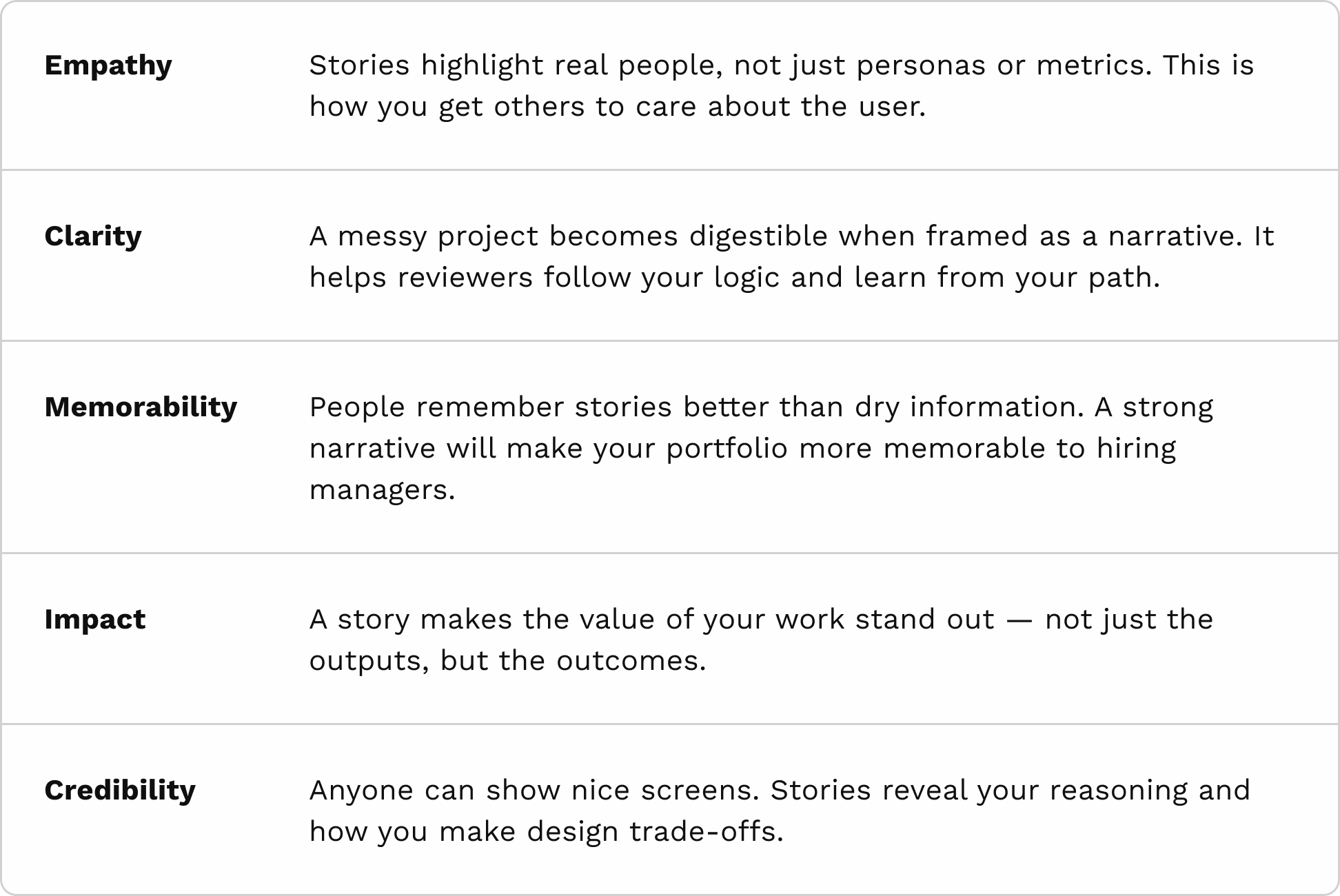
Why UX storytelling is powerful:
A good case study, for example, isn’t just a slideshow of what you did. It’s a walk-through of why you did it, and what it changed. Let’s take a look at some examples.
Real-world UX storytelling use cases
UX storytelling goes far beyond just writing case studies. It’s a communication skill that cuts across every layer of the design process, from explaining your work to guiding users through it. Here’s how storytelling shows up in four core UX practices:
Portfolios and case studies
What it is: Framing your design journey like a narrative, from challenge to resolution, a great way to do case study storytelling.
Why it works: Recruiters and hiring managers aren’t just scanning for skills. They want to understand how you think. A story gives them context, logic, and impact.
Example:
Instead of listing:
“Ran usability test → Updated homepage layout → Improved conversion by 18%”
Put it like this:
“Users hesitated on the homepage because the value proposition wasn’t clear. One participant said, ‘I’m not sure what this site is for.’ So we tested new layouts with a stronger headline and visual hierarchy. The winning version led to an 18% lift in signups.”
Pro tip: Focus on turning points, a moment of insight, a tough trade-off, a surprising test result, to keep the story dynamic and human.
Stakeholder presentations
What it is: Using storytelling to align non-design stakeholders with your goals, research, and design rationale.
Why it works: Numbers alone don’t move hearts. Stories do. A clear user narrative can shift decisions and build support.
Example:
Start with a user:
“Meet Jamal. He’s 28, works night shifts, and accesses our platform on a 7-year-old Android phone. He told us, ‘I just want to check my hours fast and get out.’ But the current login flow took him 6 taps and 40 seconds.”
Then frame your design as a response:
“Our redesign reduced login time to 8 seconds, a small change with a big human impact.”
Pro tip: Follow a story arc: Setup (user problem), Conflict (friction), and Resolution (your design). Use quotes and photos if possible to keep the human at the center.
UX writing & Microcopy
What it is: Applying storytelling principles to the smallest touchpoints, buttons, error messages, onboarding flows, to guide users emotionally and functionally.
Why it works: Microcopy isn’t just about being clear, it’s about anticipating how users feel. That’s storytelling at a micro-scale.
Example:
Instead of:
“Error: Invalid credentials.”
Say:
“Hmm, that didn’t work. Want to try again or reset your password?”
This turns frustration into reassurance, and puts the user back in control, a classic emotional beat in UX storytelling.
Pro tip: Think of each micro-interaction as a mini-scene. What is the user thinking right now? What’s the tone they need? Are you helping them move forward?
UX workshops & Education
What it is: Teaching concepts like accessibility, prototyping, or research with relatable narratives and scenarios.
Why it works: Abstract principles become sticky when anchored in lived experiences. Stories make new knowledge easier to absorb and remember.
Example:
Instead of listing accessibility guidelines, tell a story:
“When we tested the new color scheme, Elena, a legally blind participant, couldn’t see the call-to-action button at all. She said, ‘I just kept scrolling, thinking I missed something.’ That was our wake-up call.”
Pro tip: When teaching, borrow from classic storytelling tools, like
- Introduce characters (users, teammates, test participants)
- Build tension (what went wrong or was misunderstood)
- Show transformation (what you changed, what was learned)
UX research & Insight communication
What it is: Presenting research findings as a coherent narrative instead of a collection of observations or quotes.
Why it works: Research often loses impact when it’s reduced to bullet points. A narrative connects individual insights into a bigger picture and helps teams act on them.
As an example, instead of listing findings:
- Users are confused during onboarding
- Drop-off rate is high on step 2
You can frame it like this:
“During onboarding, users reach the second step with a clear intention, but hesitation appears when they are asked to provide additional information. Several participants paused or abandoned the process at this point, suggesting uncertainty rather than lack of interest.”
Pro tip: Focus on patterns and progression. Show how insights connect, not just what they are.
UX storytelling in case studies
UX storytelling is most visible in case studies. This is where your ability to explain your thinking has the biggest impact on how your work is evaluated.
A strong UX case study doesn’t just document what happened. It shows how you approached a problem, what decisions you made along the way, and how those decisions led to a measurable outcome.
This is the difference between a report and a story.
In a report, you list steps:
- Research conducted
- Wireframes created
- Prototype tested
In a story, you connect those steps:
“You noticed that users were dropping off during onboarding. Initial assumptions pointed to usability issues, but early tests showed hesitation around trust instead. This shifted the focus of the design. Instead of simplifying the flow, you clarified messaging and visual cues, which reduced drop-off and improved completion rates.”
The structure is the same. The difference is how clearly the reasoning is communicated.
A well-made case study usually makes three things explicit:
- Problem in context (not just what was wrong, but why it mattered)
- Decisions and trade-offs (what you chose to do and what you rejected)
- Outcome and impact (what changed and how it was measured)
This is where storytelling becomes practical. It helps you highlight the moments that shaped the project instead of treating every step as equally important.
- If you’re still building your first case studies, this guide on UX case studies for beginners can help you understand what to include and how to approach them.
- In case you want to refine your structure further, this article on UX case study structure goes into more detail on how to organize your narrative.
Structuring your case study into a clear narrative can be challenging, especially if you’re not sure what to include. UXfolio’s Case Study Generator helps you get started with a structured draft, so you can focus on explaining your decisions instead of figuring out the format.
A simple way of doing UX storytelling
Use this 5-part arc to craft better UX case studies and presentations:
1. The problem (The Setup)
Introduce the situation. What was broken? Who did it affect? Make the user’s pain vivid, not just functional, but emotional.
“Users couldn’t complete checkout on mobile, not just due to bugs, but because they felt overwhelmed and unconfident.”
2. The user (Context)
Introduce the people behind the data. Share quotes, frustrations, even a short backstory. This builds emotional investment.
“Ana, a 32-year-old mother, said she ‘gave up’ on the app because it felt like ‘filling out a government form’.”
3. The process (Journey)
Explain what you did and how your thinking evolved. Highlight key decisions, changes in direction, and anything that didn’t work as expected.
“We initially tried reducing the number of steps, assuming it would simplify the experience. However, testing showed that users needed clearer structure, not fewer steps.”
4. The result (Outcome)
Show what changed. Metrics are good, context is better. Tell what success meant for users, business, or team operations.
“After redesign, mobile completion rates rose by 22%. But more importantly, satisfaction scores jumped from 3.1 to 4.6.”
5. The reflection (What you learned)
Share what you learned, how you grew, and what you’d improve. This shows maturity and thoughtfulness.
“Looking back, I’d involve developers earlier, our assumptions caused extra work.”
If you’re unsure how to translate this structure into an actual case study, UXfolio’s guided sections give you a clear starting point. Instead of building everything from scratch, you can follow a framework that already supports storytelling.
Common UX storytelling mistakes (and what to do instead)
Even when designers understand the idea of storytelling, it’s easy to fall into patterns that make case studies harder to follow or less convincing.
Here are a few common mistakes to watch out for:
Treating the case study as a timeline
Listing everything you did in chronological order often leads to long, unfocused case studies. Not every step carries the same weight.
What to do instead: Focus on key moments, where something changed, where a decision was made, or where an insight shifted the direction.
Overloading the story with outputs
Adding too many screens, deliverables, or research artifacts can dilute the narrative. It becomes harder to see what actually mattered.
What to do instead: Select only the elements that support your reasoning. Each artifact should help explain a decision or an outcome.
Skipping the reasoning behind decisions
A common issue is showing what changed without explaining why it changed. This makes the work harder to evaluate.
What to do instead: Make your thinking explicit. Briefly explain what you considered, what you rejected, and why you moved forward with a specific direction.
Focusing only on the final result
Jumping straight to the outcome can make the story feel incomplete. It removes the context that makes the result meaningful.
What to do instead: Show the progression. Even a short explanation of the problem and the process makes the result easier to understand.
If you want a more detailed breakdown of common pitfalls, this article on UX case study mistakes goes deeper into what to avoid and how to improve.
UX storytelling techniques you can apply immediately
Once you understand the basics of UX storytelling, the next step is applying it in small, practical ways. These techniques don’t require a full rewrite of your case study, they help you improve clarity and flow with minimal effort.
Focus on moments, not steps
Not every action in your process needs equal attention. What makes a story engaging is change, a moment where something shifts. Instead of documenting everything, highlight the points where your understanding evolved or where a decision changed the direction of the project.
Make decisions visible
Design work often looks straightforward in hindsight. Without context, it can seem like the final solution was obvious. To avoid this, briefly show what alternatives you considered and why you didn’t choose them. This makes your thinking easier to follow and your decisions easier to evaluate.
Use real user input where it matters
You don’t need to include every research detail, but a well-placed quote or observation can anchor your story. A single sentence from a user can often explain a problem more clearly than a paragraph of description.
Show progression, not just outcome
A strong narrative has movement. If you only present the final solution, the story feels incomplete. Even a short explanation of how the initial idea changed over time can make your work more understandable.
Keep the narrative aligned with the outcome
Every part of your story should support the final result. If a section doesn’t contribute to understanding the outcome, it’s worth reconsidering its place This helps keep your case study focused and easier to scan.
Refining how you present your work often comes down to small improvements in clarity and tone. UXfolio’s AI Text Enhancement helps you polish your case study content, making your thinking easier to follow without changing your voice.
How UXfolio helps you tell better stories
Telling a clear story about your work is often harder than it seems. Structuring your thoughts, selecting what to include, and presenting it in a coherent way takes time and practice.
This is where UXfolio can help. Instead of starting from a blank page, you get a structure that already supports storytelling.
Here’s how:
Guided case study structure
UXfolio provides predefined sections tailored to UX case studies, such as research, ideation, and testing. These sections act as a starting point, helping you organize your story without having to figure out the structure from scratch.
AI-assisted drafting
You can generate an initial draft of your case study based on a few inputs. This gives you something to work with, which you can refine and shape into your own narrative.
Built-in device mockups
You can present your designs in realistic device frames, making it easier to connect visuals to your story and show how your work functions in context.
Easy customization
With curated styles, fonts, and layouts, you can adjust the visual presentation of your portfolio without disrupting the structure of your case study.
The goal is not to automate storytelling, but to support it. UXfolio gives you a foundation that helps you focus on your decisions, your process, and the impact of your work, instead of formatting and layout.
Final takeaway
UX storytelling is not about making your work sound more impressive. It’s about making it easier to understand. When your case studies are structured as clear narratives, your decisions become more visible, your process becomes easier to follow, and your impact becomes easier to evaluate.
This is what helps your work stand out, not more content, but better clarity.
If you want to improve your portfolio, start by looking at how you present your thinking. Focus on the moments that shaped your work, not just the steps you took. That shift alone can make a significant difference in how your work is perceived.
If you want to apply these ideas in practice, UXfolio gives you a structured environment to build and refine your case studies. This way, you can focus on your decisions and storytelling, not formatting.
Frequently asked questions
What is UX storytelling?
UX storytelling is the practice of presenting your design work as a structured narrative. Instead of listing steps or deliverables, it connects problems, decisions, and outcomes into a clear and understandable flow.
Why is storytelling important in UX?
Storytelling helps others understand your thinking. It makes your decisions easier to follow, your process more transparent, and your work more memorable, especially in case studies and presentations.
How do you use storytelling in a UX case study?
You can structure your case study as a narrative: define the problem, introduce the user context, explain your process and decisions, present the outcome, and reflect on what you learned.
What makes a good UX story?
A strong UX story focuses on clarity. It highlights key decisions, explains trade-offs, and shows how the work evolved over time instead of documenting every step.
How is UX storytelling different from regular storytelling?
UX storytelling is not about creating fictional narratives. It’s about clearly explaining real design decisions and their impact, using a structure that is easy to follow.
What are common UX storytelling mistakes?
Common mistakes include presenting work as a timeline, overloading case studies with outputs, and not explaining the reasoning behind decisions. These make the story harder to understand and evaluate.
Can UX storytelling improve your portfolio?
Yes. Well-structured case studies make it easier for recruiters and hiring managers to understand your thinking, which is often more important than the final visuals alone.
You must be logged in to post a comment.