
Using AI in a UX portfolio is no longer optional. The question is whether it helps your work stand out or makes it harder to trust.
Most UX portfolios don’t fail because the work is weak. They fail because the thinking behind the work is hard to follow. Case studies show screens and flows, but not the decisions that led to them.
So where does AI fit into this? Can it actually improve your UX case studies, or does it risk making them feel generic?
In this guide, you’ll learn how to use AI to structure your UX portfolio, clarify your decisions, and make your case studies easier to evaluate without losing your own thinking.
Page content
- Can you use AI in a UX portfolio
- Why AI is reshaping UX portfolio expectations
- Where AI actually fits in your UX portfolio workflow
- Practical ways to use AI in UX case studies
- Common mistakes when using AI in UX portfolios
- How to keep your UX portfolio authentic when using AI
- How UXfolio supports AI-assisted UX portfolios
- Final takeaway
- Frequently asked questions
Can you use AI in a UX portfolio
AI is already part of how UX designers work, from research synthesis to case study writing. The question is no longer whether you can use AI in a UX portfolio, but how that use is evaluated.
A UX portfolio is not judged as writing. It is evaluated as evidence of decision-making. Hiring managers are not trying to detect AI usage, they are assessing how you define problems, make decisions, and handle trade-offs.
The difference is not AI itself, but how it is used: to clarify thinking or to replace it.
Is AI acceptable in UX case studies
Most hiring teams already assume some level of AI assistance, especially in writing and structuring.
A strong case study reflects constraints, trade-offs, and reasoning that can be discussed in detail. If AI improves clarity, it helps. If it generates explanations that were never part of the process, it weakens credibility.
The real question is fidelity: how accurately the case study represents what actually happened.
What hiring managers actually evaluate in UX portfolios
Portfolios usually fail because the thinking is hard to follow, not because the work is weak.
Hiring managers look for problem definition, handling of uncertainty, and how decisions evolved. They also evaluate ownership: what you influenced and why. Presentation only matters if it supports understanding. A polished case study that hides reasoning performs worse than a simple one that makes decisions clear.
Note: While AI can improve structure and readability, it cannot replace clear, defensible decisions.
AI-assisted vs AI-generated portfolios (critical distinction)
The difference between AI-assisted and AI-generated portfolios is not about tools, but about authorship.
An AI-assisted portfolio is grounded in real work. You made decisions, navigated constraints, and reached outcomes through your own reasoning. AI is used to clarify best, how that process is communicated.
An AI-generated portfolio reconstructs the narrative without being anchored in actual decisions. The output may sound fluent, but it often follows generic UX patterns rather than project-specific reality.
This difference becomes visible in interviews. When asked to go deeper, AI-assisted case studies hold up. AI-generated ones collapse into general statements that are difficult to defend.
From a hiring perspective, this is the real dividing line.
Why AI is reshaping UX portfolio expectations
UX portfolios have always reflected how design work is understood at a given time. For years, the focus was on documenting the process step by step, from research to final UI.
AI hasn’t changed this foundation, but it has accelerated an existing shift. The focus is moving away from what you did toward how you think and why you made specific decisions.
This shift is subtle, but it redefines what a strong UX portfolio looks like. However this shift is not limited to portfolios. It reflects a broader transformation happening across the UX profession, where AI is changing how designers research, make decisions, communicate their work, and create value throughout the design process.
From documentation-heavy portfolios to decision-driven storytelling
Many UX portfolios still follow a linear structure: research, ideation, design, testing, and final output. This reflects how the work happened, but not how it is evaluated.
Hiring teams are not trying to reconstruct your timeline. They are trying to understand how you approached problems and why you made specific decisions.
Documentation-heavy storytelling: prioritizes completeness, often at the expense of clarity. It shows everything, but doesn’t highlight what matters.
Decision-driven storytelling: reorganizes the same material around reasoning. The focus shifts from sequence to causality.
- What triggered a decision?
- What alternatives existed?
- Why a direction was chosen?
This structure aligns more closely with how portfolios are actually evaluated.
The shift toward structured UX thinking
Structure has always been important in UX, but it has become a much more explicit expectation.
Earlier portfolios could rely on implicit understanding. Reviewers were willing to piece together the reasoning themselves from visuals, notes, and descriptions.
This has been changed.
Today, portfolios are reviewed under tighter time constraints and higher volume. At the same time, AI-generated content has raised the baseline for surface-level clarity. As a result, structure became a filtering mechanism.
A well-structured case study makes it easier to identify the problem, understand your interpretation, and follow your reasoning.
AI contributes to this shift in an indirect way. It makes structured output easier to produce, which raises expectations for everyone else. You should be aware, that structure alone is no longer enough, it has to be supported by real decision logic. Tools like Claude AI can help organize and refine case study narratives, but the underlying insights and design decisions must still come from the creator.
Without that, even a well-organized case study feels empty.
Why detailed, unstructured case studies no longer work
There was a time when more detail meant a stronger portfolio. Designers included every step, iteration, and artifact to show completeness.
That approach no longer scales. Detail without prioritization creates noise, making it harder to see what actually mattered. The issue is not detail itself, but the lack of hierarchy.
Keep in mind, that portfolios are compared quickly across candidates so clarity matters more than completeness. AI reinforces this challenge. It makes it easy to produce long, fluent explanations that feel complete but lack focus.
Strong case studies do not try to show everything. They make it clear “what matters and why”.

Where AI actually fits in your UX portfolio workflow
AI doesn’t sit at a single point in the UX portfolio process. It doesn’t create a case study or define what good work looks like.
Its value appears in specific moments where designers struggle: organizing thinking, clarifying decisions, and turning fragmented material into a coherent narrative.
In practice, the main difficulty is not producing content, but making sense of it. Notes are scattered, decisions are often implicit, and case studies are written long after the work is done.
This is where AI becomes useful, not as a generator, but as a structuring layer.
Choosing the right projects for your portfolio
One of the most underestimated decisions in a UX portfolio happens before writing even starts: selecting which projects to include.
Many designers default to completeness. Everything that feels “finished” or “interesting” gets included. The result is often a portfolio where depth is uneven and the overall narrative becomes unclear.
The real question is not how many projects you can show, but what each project communicates about your thinking.
AI can support this stage by helping you step outside your own effort bias. Projects that feel complex to execute are not always the strongest signals of decision-making clarity. Some of the most technically demanding work can still be weak in terms of storytelling value.
Used properly, AI can help surface patterns across your work. Key questions you should ask when making decisions:
- Which projects show clearer problem framing?
- Where are your decisions most visible?
- Where outcomes are easiest to explain?
The final selection still belongs to you, but the evaluation becomes less emotionally driven and more structured.
Structuring UX case studies and narratives
Most UX case studies naturally follow the order in which the work happened. That makes sense internally, but it doesn’t always support external understanding.
Note: Once projects are selected, structure becomes the main bottleneck.
Reviewers are not trying to reconstruct your process chronologically. They are trying to understand how you think. This is where structure matters more than sequence.
AI can help reorganize raw material into a more readable logic: separating context from decisions, grouping related insights, and highlighting progression from problem to outcome. The key point is that it doesn’t add new meaning, it exposes what is already there in a clearer form.
Important: Structure only works if the underlying reasoning exists. If decisions were never clearly articulated during the project, restructuring alone will not fix the narrative.
Explaining UX decisions clearly
This is usually the weakest point in UX portfolios. Designers often describe actions instead of decisions. They show what was done, but not why it was done. As a result, the case study becomes descriptive rather than analytical.
The difference is subtle but important.
- “Redesigned the navigation” is an action.
- “Changed the navigation because users failed to locate key features during testing” is a decision.
AI can help identify vague explanations and suggest clearer articulation, but it cannot reconstruct intent that was never defined. Its value lies in sharpening expression, not inventing reasoning.
Pro tip: Strong UX case studies always make one thing visible: the link between insight, decision, and outcome.
Improving flow, clarity and readability
Even well-structured case studies can fail if the reading experience is heavy. UX portfolios are rarely read line by line. They are scanned first, then selectively read in detail. That means clarity and flow directly influence whether your work gets properly evaluated.
Flow issues usually appear when:
- sections repeat similar ideas
- insights appear too late in the narrative
- transitions between steps are unclear
- important decisions are buried in long explanations
AI can help smooth these transitions by highlighting redundancy or suggesting more direct ways of connecting ideas. But again, this is refinement work, not conceptual work.
The goal is not to simplify your thinking. It is to make it easier to follow.
Visual refinement in portfolios
Visual presentation is often misunderstood in UX portfolios. It is not a replacement for clarity, but a reinforcement layer.
Clean hierarchy, readable spacing, and consistent structure make it easier for reviewers to scan and locate key information. But visuals alone cannot compensate for unclear reasoning.
AI can assist with presentation-level improvements, but its impact here is secondary. The real driver of portfolio quality remains the clarity of decisions and narrative structure.
A visually polished case study that lacks reasoning still fails evaluation. A simple one that clearly explains decisions often succeeds.
Practical ways to use AI in UX case studies
The real value of AI in UX portfolios only becomes visible when it is applied to messy, real inputs. Not polished drafts, not finished narratives, but the kind of fragmented material most designers actually start with:
- research notes,
- half-formed ideas,
- scattered feedback and,
- incomplete explanations of decisions.
At this stage, AI is not about generating content. It is about reducing friction between what you know about a project and how clearly you can explain it.
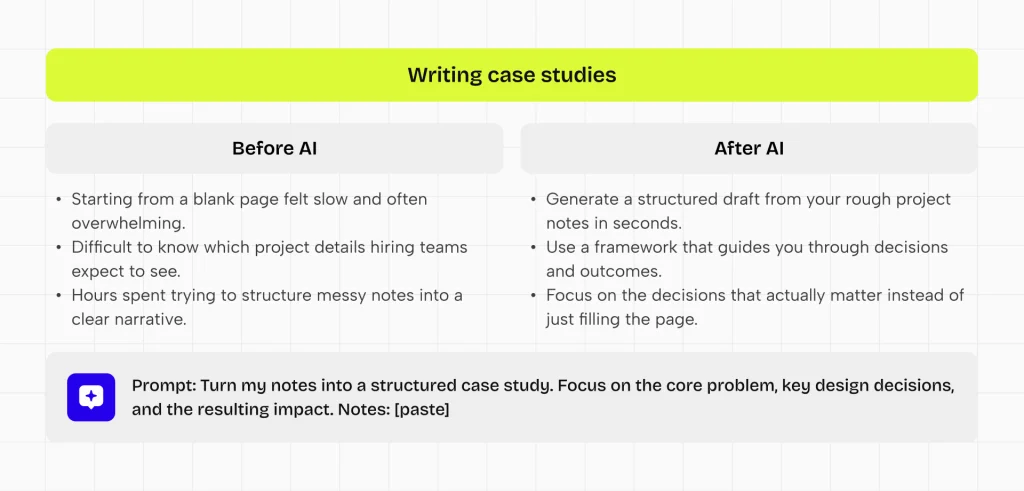
Turning raw UX notes into structured narratives
Most UX case studies don’t start as narratives. They start as a buildup. Interview notes, usability findings, stakeholder comments, sketches, and iteration logs rarely exist in a clean sequence.
The first challenge is not writing. It means grouping related information into a clear, coherent structure.
AI can help here by surfacing structure from unorganized material. When used well, it can group related insights, separate signals from noise, and suggest a logical progression from problem context toward decision points.
What matters is not the output itself, but what it reveals: where your strongest insights are, and how they connect.
Improving unclear UX explanations
A common issue in UX portfolios is not missing content, but weak articulation.
Designers often rely on generic phrases like “improved usability” or “optimized flow”, which add little evaluative value.
These phrases sound correct, but they carry very little evaluative weight. AI can be useful here as a diagnostic layer. It helps identify where explanations lack specificity or where decision logic is implied rather than stated.
The real improvement happens when unclear descriptions are replaced with grounded reasoning like:
- What triggered the decision?
- What alternative directions were considered?
- What changed as a result?
The key point is not linguistic improvement. It is making thinking visible.
Detecting missing logic or decision gaps
Even strong projects often have structural gaps when translated into case studies. Typical gaps include missing transitions between research and design decisions, unexplained shifts in direction, or outcomes that are presented without clear causal links.
These gaps are difficult to notice when you are close to the work, because your own mental model fills in what is missing.
AI can act as an external reader in this situation. It helps surface where the narrative jumps too quickly, where reasoning is assumed rather than explained, or where decisions appear without sufficient context.
This is less about correction and more about visibility. It highlights where your internal understanding is not yet fully translated into external clarity.
The important follow-up step is always manual: reconnecting those gaps with real project reasoning, not fabricating explanations.
Improving scannability and section hierarchy
UX portfolios are not read like essays, but scanned first, and only partially read depending on relevance and clarity. This changes what “good writing” means in this context.
Clarity is not just about sentence quality. It is about how easily a reviewer can extract meaning from structure: where the problem is, what changed, and why it matters.
AI can help refine this layer by identifying:
- dense sections,
- repetitive explanations,
- unclear transitions.
It can suggest where information should be condensed or redistributed for better readability. But the underlying principle remains the same: scannability is a structural problem, not a stylistic one.
Common mistakes when using AI in UX portfolios
Using AI in UX portfolio writing often introduces problems that are not immediately visible in the output. Most of these mistakes are not about grammar or structure, but about how AI subtly replaces or distorts the underlying UX thinking.
The result is case studies that may look complete, but fail to communicate how decisions were actually made.
Replacing thinking with generated content
The most critical failure when using AI in UX portfolios happens if it starts replacing thinking instead of supporting it.
In these cases, the case study may still look structured and well-written, but the reasoning behind decisions is no longer anchored in the actual design process.
Instead, it is reconstructed after the fact in a way that sounds reasonable, but does not reflect real constraints, trade-offs, or lived project context.
This creates a credibility gap. UX portfolios are evaluated as evidence of how decisions were made under uncertainty. When the explanation cannot be traced back to real reasoning, reviewers quickly lose trust in the narrative.
Generic, template-driven case studies
A major downside of relying too much on AI is that case studies start to look and sound exactly the same.
Problem → process → solution → outcome
These patterns start to appear everywhere, but the substance inside the sections becomes interchangeable. The story changes less than the wording, which creates a false sense of variety.
The issue is not structure itself, but the loss of specificity. When context, constraints, and decision logic are replaced with generalized UX language, case studies begin to feel like variations of the same template rather than reflections of distinct design problems.
This makes differentiation difficult. Hiring teams stop seeing how a designer thinks in unique situations and instead see a familiar pattern of “UX storytelling”.
Over-polished narratives that lose authenticity
Another common issue is over-refinement. As AI smooths tone and flow, the narrative can become too clean. While this improves readability, it often removes signals of iteration, uncertainty, and trade-offs.
Strong UX work is rarely linear or perfect. When the storytelling removes all tension, it also removes evidence of real problem-solving.
The result is a case study that reads well, but feels disconnected from actual design reality.
Weak articulation of decisions and trade-offs
One of the most consistent weaknesses in AI-assisted portfolios is the reduction of decision clarity.
Descriptions become centered around what was done, while the reasoning behind choices remains implicit or generalized. AI often reinforces this by optimizing for readability rather than precision.
But UX evaluation depends on something more specific: how decisions were made under limitations.
If trade-offs are not clearly articulated, reviewers cannot assess the quality of thinking behind the work. Without that visibility, even strong projects become difficult to evaluate accurately.
How to keep your UX portfolio authentic when using AI
AI can improve how efficiently you write and structure UX case studies, but it also introduces a subtle risk: your portfolio starts to feel less like a reflection of your own thinking and more like a refined version of a generic UX narrative.
Authenticity here does not mean avoiding AI entirely, but ensuring that your real decision-making process remains visible and traceable throughout the story.
Making your decision-making visible
Authenticity in a UX portfolio is primarily defined by how clearly your decisions can be followed.
Each case study should make it easy to understand what problem you were solving, what options you considered, and why a specific direction was chosen. If these elements are missing or blurred, even well-written content loses credibility, because the reasoning behind the work becomes invisible.
AI can help clarify language, but it cannot compensate for unclear thinking. If decisions are not explicitly defined in your process, they cannot be reconstructed convincingly afterward. Visibility must come from the work itself.
Using AI as a reviewer, not a writer
One of the most effective ways to preserve authenticity is to change the role AI plays in your workflow.
Instead of using it to generate case study text, use it to challenge your clarity. Ask it to identify where explanations are unclear, where reasoning is missing, or where transitions between decisions are weak.
This keeps ownership of the narrative with you while still benefiting from an external perspective. The key difference is control: AI evaluates your thinking, but does not define it.
When AI becomes the writer, the connection to real UX decisions starts to weaken. When it remains a reviewer, it strengthens articulation without deforming intent.
Keeping a consistent narrative voice across case studies
Consistency in UX portfolios is not about uniform wording, but about stable reasoning patterns.
Each case study should feel like it comes from the same design mindset, even if the projects differ in scope or complexity. If AI is used inconsistently across sections or projects, tone and structure can drift, creating a fragmented portfolio experience.
The safest approach is to establish your own draft first, grounded in how you understand the project. AI can then be used for refinement, but not for redefining the narrative structure itself. This ensures that improvements in clarity do not come at the cost of coherence or authorship.
How UXfolio supports AI-assisted UX portfolios
AI can speed up writing and structuring, but it does not solve the core challenge of UX portfolios: making your decision-making easy to evaluate.
Without a clear structure, AI tends to produce content that sounds complete but remains difficult to assess. The issue is not fluency, but alignment. When explanations are not anchored in real decisions, even well-written case studies lose credibility.
UXfolio addresses this at a different layer. Instead of focusing on generating content, it structures how your work is translated into a case study. This ensures that any AI support stays grounded in actual UX thinking rather than drifting toward generic narratives.
Structured case study building as foundation
Most portfolio problems start before writing. Designers have the material, but not the structure to turn it into a clear narrative.
This is where UXfolio’s Case Study Generator becomes relevant.
Structuring UX case studies can be challenging, especially when you are unsure what hiring teams expect to see. UXfolio helps by guiding you through the core sections commonly found in strong UX portfolio examples.
The process couldn’t be simpler, just:
- select the sections relevant to your project,
- upload a key screen, and
- add a short description.
The tool then creates a structured starting point, helping you organize your case study around the decisions, trade-offs, and outcomes that matter most.
This will significantly streamline your workflow.
Instead of starting from a blank page, you begin with a framework that already reflects how UX work is evaluated. That shift is important. It moves the focus away from “what should I write” toward “what decisions actually matter here.”
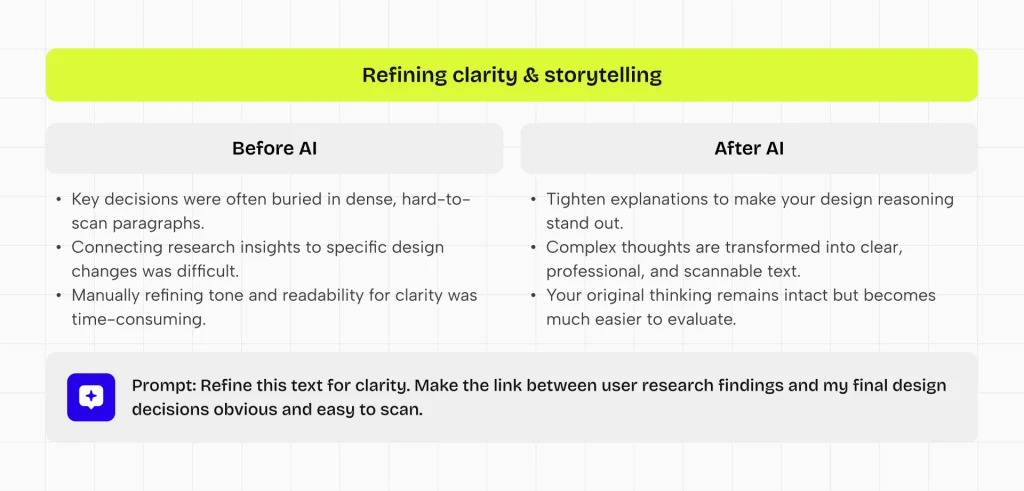
Supporting clearer UX storytelling through AI text refinement
Clarity in UX portfolios is rarely a writing problem. It is a structuring problem that shows up in writing.
Designers often know what happened in a project, but struggle to explain why things happened and how decisions connect. This is where targeted writing support becomes useful.
Features like UXfolio’s AI Text Enhancement help refine case study content by improving clarity, tone, and readability. The goal is not to replace the designer’s voice, but to make their thinking easier to follow.
This is especially valuable in longer case studies, where small clarity issues accumulate and make reasoning harder to trace. By tightening explanations and reducing ambiguity, the connection between insights, decisions, and outcomes becomes more visible.
The result is not a more polished case study, but a more understandable one. Your thinking remains intact, but becomes easier to evaluate.
Improving portfolio scannability through structured layouts and visuals
UX portfolios are not read linearly. They are scanned, compared, and evaluated under time constraints. This makes visual structure a critical part of how your work is perceived.
UXfolio’s Case Study Grid addresses this at the portfolio level by automatically organizing your projects into a clean, balanced layout. Instead of manually arranging cards, your portfolio maintains a consistent structure that supports quick navigation and comparison.
At the case study level, the Thumbnail Designer helps you create consistent visual entry points for each project. You can generate structured thumbnails using different device layouts, mockup styles, and custom backgrounds, directly within your workflow.
These visual elements are not just decorative. They reinforce hierarchy, improve orientation, and reduce cognitive load during review.
When combined with clear writing, they create a portfolio that is not only understandable, but also easy to navigate under real hiring conditions.
Aligning AI assistance with real UX thinking
The main risk with AI-assisted portfolios is not poor writing. It is a misalignment between what is written and what actually happened in the project.
UXfolio is keeping AI assistance tied to real inputs. Instead of generating standalone narratives, it operates on top of your existing case study structure and content. This keeps every refinement anchored in actual decisions, constraints, and outcomes.
This alignment extends beyond individual case studies.
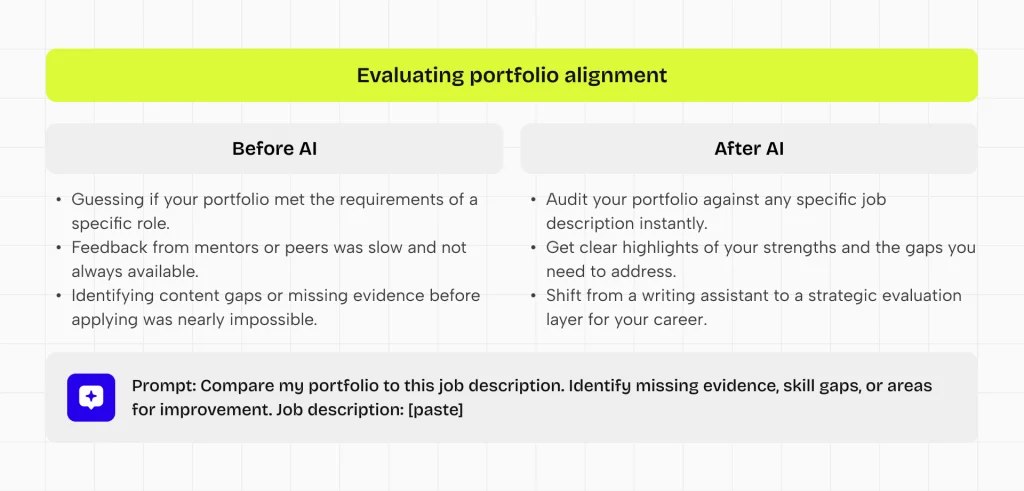
With tools like the Job Fit Checker, you can evaluate how well your portfolio matches a specific role. By providing a job title, company, and job description, the system reviews your portfolio and highlights strengths, gaps, and areas that need improvement.
This shifts AI from a writing assistant to an evaluation layer. Instead of only improving how your case studies read, it helps you understand how they perform in a hiring context.

Final takeaway
AI is changing how UX portfolios are written, but it is not changing what makes them valuable. A strong UX portfolio has never been about polished language or perfect presentation. It has always been about how clearly a designer can explain decisions, constraints, and outcomes.
When used correctly, AI does not replace this foundation. It simply reduces the friction between your thinking and how it is communicated. It helps structure complexity, improve clarity, and surface reasoning that might otherwise remain implicit.
The risk appears when AI starts to replace decision-making instead of supporting it. At that point, the portfolio may still look complete, but it stops reflecting real UX work. Once that connection is lost, the case study becomes difficult to trust or evaluate.
The strongest UX portfolios will not be the ones that avoid AI, nor the ones that depend on it heavily. They will be the ones where real design thinking remains visible, and AI is used only to make that thinking easier to understand.
In that sense, AI does not redefine UX portfolios. It simply makes the quality of your thinking more visible if you keep the necessary balance between.
Frequently asked questions
Can I use AI to write my UX portfolio?
Yes, but only as support, not as the main author. AI can help structure ideas, improve clarity, and refine language. It should not replace your explanation of decisions.
Will recruiters detect AI usage?
Recruiters usually do not try to detect AI usage directly. What they do notice is lack of specificity. If a case study is too generic, too polished, or missing clear decision logic, it can feel “AI-generated,” even if it isn’t.
Is AI bad for UX case studies?
AI is not inherently good or bad. Its impact depends on how it is used. When it supports structure and clarity, it improves communication.
What is the best way to use AI in UX portfolios?
Use AI after your thinking is defined. First, clarify the problem, your decisions, and the outcomes. Then use AI to improve how clearly these are expressed.
Does AI improve hiring chances for UX designers?
AI can improve your chances indirectly, through clarity. Hiring decisions depend on how well your thinking can be understood. If AI helps you communicate decisions more clearly, your portfolio becomes easier to evaluate.
You must be logged in to post a comment.