
The era of manual production in UX design is over. AI has turned what was once manual labor into a commodity.
This shift feels like a threat to many – especially junior designers who spent years mastering software shortcuts – but the reality is an evolution. Today, your value isn’t defined by how fast you use a tool, but by how well you direct it.
This guide is your blueprint for becoming an AI-augmented designer: focusing on the strategic signals while automation handles the noise.
Page content
- The shift from execution to curation: Why AI is rewriting the UX playbook
- The three pillars of AI-augmented UX workflows
- The “AI Sandwich” framework: Maintaining quality control
- Best AI UX design tools for 2026
- The AI-augmented designer: Essential skills for the next decade
- Future-proofing your career: Why junior designers need AI literacy now
- Frequently asked questions
The shift from execution to curation: Why AI is rewriting the UX playbook
Some designers assume AI is just a speed hack. This is a mistake. Speed is the byproduct, but the real shift is in your mental model. If a machine can generate a high-fidelity layout in seconds, your value as a designer is no longer in the act of making. Your value is in the act of choosing.
What is AI UX design? – Beyond the hype
AI UX design is not a single tool or a magic “generate” button. It is a hybrid workflow where the designer acts as a director. It is the practice of using algorithmic power to process large amounts of data or generate multiple variations, then applying human judgment to decide which path is viable.
At its core, this is about moving away from the “pixel-pushing” mindset. An AI-augmented workflow handles the repetitive, predictable parts of the interface. This allows you to step back and look at the system as a whole. You are no longer just building screens: you are managing the logic that connects them.
Moving from pixel-pushing to problem-solving
For a long time, being a “pro” meant knowing every Figma plugin and master component strategy. Today, those skills are the baseline. When anyone can prompt a layout, visual polish is no longer a competitive advantage.
The real work has moved upstream. You are now a problem-solver first and a visual communicator second. Your job is to define the “why” before the machine handles the “how”.
For instance, AI can give you fifty different ways to design a checkout flow, but it cannot tell you which one aligns with your company’s unique business constraints or your users’ specific emotional state.
This is where the real value appears.
How AI shortens the insight-to-action ratio in product teams
The biggest waste of time in modern product teams is the “documentation gap”. This is the friction that happens between finishing a research session and making a design decision. Historically, this involved days of tagging notes and debating patterns before the AI era.
AI-augmented designers close this gap by automating the synthesis. By using tools to cluster research data or generate initial wireframe drafts based on interview transcripts, you can move from an insight to a testable prototype in hours instead of weeks.
Pro tip: This doesn’t just save time, but creates a tighter feedback loop. You have more time to fail early and refine often, which is the only way to build truly high-quality products.
In order to use AI effectively, you cannot treat it as a random collection of tools. You must integrate it into the core stages of your project. By looking at the UX lifecycle through three specific pillars, you can identify where automation provides the highest leverage and where your human intuition remains non-negotiable.
The three pillars of AI-augmented UX workflows
The goal of an augmented workflow is to stabilize the most volatile parts of the design process. It is about creating an environment where AI handles the heavy lifting of data organization and drafting, leaving you to focus on the high-level logic that defines a successful product.
Strategic research and pattern recognition
Qualitative research has always been a race against time. Researchers often struggle to process hours of recordings and pages of messy notes before stakeholders demand results. This creates a mechanical burden that forces many designers to skip deep synthesis in favor of surface-level observations.
AI has effectively neutralized this problem. By automating transcription and thematic clustering, AI allows you to look at your data through a wider lens. You can now synthesize patterns across dozens of user sessions in the time it used to take to review one.
The real win is making research findings accessible to the entire team. When data is easy to organize, it becomes a continuous fuel for design rather than a one-time gatekeeper. However, as we explore in our guide on how to use AI in UX research, the machine identifies the “what,” but you must provide the “why.”
Your role is to spot the “micro-frustrations and emotional contradictions” that an algorithm might categorize as noise but are actually the key to a breakthrough.
Accelerated ideation and prototyping
The blank canvas is the most expensive phase of any project. Junior designers often waste days trying to find the perfect starting point for a wireframe. AI-augmented workflows solve this by providing a generative baseline.
Instead of starting from scratch, you can prompt a system to generate multiple layout variations or structural models within seconds.
This shift fundamentally changes the nature of iteration. High-speed prototyping is not about finishing a UI faster: it is about exploring a broader range of possibilities before you commit to a specific direction. At this stage, AI acts as a collaborative partner that tests the limits of your initial assumptions.
When choosing from the best AI tools for UX design, focus on tools that allow you to experiment with logic and information architecture rather than just visual styles. Your job is to act as the editor. You take the machine-generated drafts, identify the structural flaws, and refine them into a professional solution that fits your specific design system.
Note: UXfolio’s AI tools help by guiding you through the core sections commonly found in strong UX portfolio examples.
Decision-driven storytelling and portfolios
Recruiters are currently being flooded with generic, AI-written portfolios. Most of these fail because they follow a predictable template: research, wireframe, final UI. They show the steps, but they do not show the designer’s mind.
AI is helping the best designers move toward a more sophisticated model: decision-driven storytelling. Instead of using AI to write your case study for you, use it as a logic-checker. AI can help you identify gaps in your narrative or help you articulate why a specific research finding led to a design change.
By using specialized systems like the AI for UX portfolios workflow, you can ensure your presentation reflects your actual thinking. The goal is to make your decision-making visible and defensible. In an era where visual polish is easy to fake, your ability to explain the strategic “why” behind your work is your only true differentiator.
As the friction of execution disappears, a new risk emerges: design by autopilot. When a machine produces a polished layout in seconds, it is tempting to accept the first result and move on.
This leads to generic products that lack intentionality. To prevent this, you need a rigorous system for quality control. We call this the AI Sandwich framework: a three-phase methodology that ensures human intelligence remains the primary driver of the creative process.

The “AI Sandwich” framework: Maintaining quality control
The AI Sandwich is a strategic layering of machine power between two slices of human expertise. It recognizes that while AI is a fast engine for generation, it is a poor engine for reasoning. By placing human judgment at the beginning and the end of every task, you ensure the final output is a deliberate solution rather than a statistical probability.
Phase 1: Setting the human context and design intent
The quality of any AI-assisted output is decided before you write a single prompt. It starts with the strategic briefing. This is where you define the problem space, the business constraints, and the user goals. AI cannot understand your company’s technical debt or the specific feedback from your last stakeholder meeting.
In this first layer, your job is to set the boundaries for the project. If you start with a vague instruction, the machine will provide a vague solution. Instead of asking for a generic checkout page, you must define the intent:
- Why are we redesigning this now?
- What constitutes a failure for this specific user segment?
By front-loading the process with high-level strategy, you ensure the machine is operating within a strictly defined logic. You are the architect: you provide the blueprints that the machine will attempt to build.
Phase 2: AI-driven exploration and generative drafting
Once the intent is established, you move to the middle layer. This is the divergent phase. The goal here is not to find the “right” answer, but to explore the widest range of possibilities. AI can generate dozens of versions in the time it takes you to sketch just one.
During this phase, your role shifts from creator to director. You are monitoring the output, adjusting the parameters, and pushing the machine to explore edge cases. It is a period of rapid iteration.
The speed of AI allows you to stay in a flow state of ideation, constantly reacting to generated drafts and rejecting the obvious choices. Use the machine to bypass your first instincts and look for unexpected patterns. The focus here is on volume: use the AI to do the heavy lifting of exploration so you can find the high-potential ideas hidden in the noise.
Phase 3: Human check, aesthetic and logic validation
The final layer is the Curation and Validation phase. This is the top slice of the sandwich, where you reassume total control. Raw AI output often suffers from hallucinated logic, like solutions that look beautiful but are functionally broken or ethically questionable.
In this phase, you should apply the stress test.
- Does this layout follow current accessibility standards?
- Does the tone of the generated copy align with the user’s emotional state in this specific moment?
- Does the proposed flow create a dark pattern?
Selection is your new craft. It is the act of filtering machine-generated noise into a professional, convergent solution. This is where your empathy, taste, and strategic judgment become the final filter.
Without this layer, your work is just a statistical average. With it, it becomes a piece of intentional design that you can confidently defend in a stakeholder review.
Pro tip: The augmented UX designer chooses tools based on their ability to solve a specific operational friction point without breaking the underlying design logic.
Best AI UX design tools for 2026
The current market has integrated platforms and these should be categorized by the problem they solve rather than their flashy features. If a tool does not help you move through the AI Sandwich framework more effectively, it is likely just a distraction.
Top generative AI tools for UI design (Figma AI, Galileo)
In the past, visual exploration used to be a time-consuming manual process. Tools like Galileo AI have changed this phase by providing high-fidelity generative baselines from simple text descriptions. This is particularly useful for junior designers during the ideation stage: seeing a concept in high fidelity early on helps you identify structural flaws that a rough wireframe might hide.
Figma AI operates closer to the actual execution phase. Its value lies in automating the “grunt work” that usually consumes hours of a designer’s week: renaming layers, organizing file structures, and generating initial component variations.
These features clean the workspace so you can focus on the logic of the interface. When using these tools, remember that every generated layout is a draft. Your job is to bring these outputs back into your design system and validate them against real technical constraints.
Leading AI tools for UX research analysis (Dovetail, Looppanel)
Synthesis is the most significant bottleneck in product development. Platforms like Dovetail and Looppanel have neutralized this friction by automating the transcription and thematic clustering of user interviews.
Instead of spending days scrubbing through video files for quotes, you can now jump directly to the most critical patterns in your data.
Looppanel, in particular, excels at identifying recurring frustrations across multiple user sessions. This allows you to manage larger datasets without losing the nuance of individual feedback. The strategic advantage here is not just speed: it is objectivity. AI helps you see patterns you might have missed due to your own cognitive biases.
Pro tip: Use these tools to organize the evidence, but keep the final interpretation as a manual human task.
Optimizing your portfolio with AI-assisted and specialized features (UXfolio)
Presenting your work is a separate design challenge that requires a distinct set of skills. While general AI tools help you create fragments, UXfolio is the only platform designed to bridge the gap between having a project and getting the job.
Most junior portfolios are rejected not because the visuals are weak, but because the thinking behind them is impossible to follow. UXfolio addresses this specific problem by aligning its AI features with UX hiring signals.
Case Study Generator
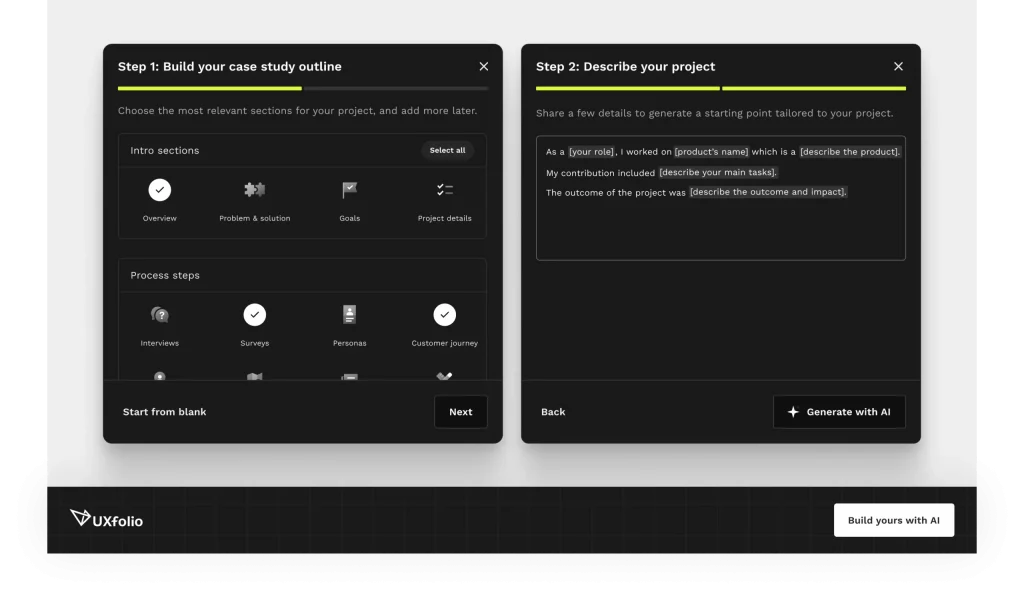
The core of a successful case study is structure. This is why the UXfolio’s Case Study Generator is a critical part of an augmented workflow. Instead of struggling with a blank page, you simply select the sections relevant to your project and add a short description. The tool then provides a structured starting point based on thousands of high-performing UX portfolio examples.
This framework allows you to concentrate on the reasoning behind your design, ensuring you organize the story around the decisions, trade-offs, and outcomes that matter most to hiring managers.
AI Text Enhancement
Once your structure is solid, the quality of your communication becomes the primary focus. Features like UXfolio’s AI Text Enhancement assist you in refining your content by improving clarity, tone, and readability. The goal here is not to replace your professional voice: it is to make your thinking easier to understand.
This system acts as a specialized evaluative layer, identifying logic gaps where the connection between a research finding and a design outcome might be unclear to a recruiter.
Case Study Grid
The final element of a hireable portfolio is scannable visual consistency. Recruiters review portfolios under extreme time pressure, which makes visual hierarchy a functional requirement. Instead of manually arranging cards, tools like UXfolio’s Case Study Grid automatically organize your thumbnails into a clean, balanced layout.
This automation ensures your most important work remains the focus, allowing you to present a polished front page without wasting time on manual pixel-level positioning.
Thumbnail Designer
To ensure a professional entry point for every project, UXfolio’s Thumbnail Designer allows you to generate consistent cover images directly within your workflow. You can easily customize these using different device layouts, mockup styles, and backgrounds.
By removing the need for external software to create covers, you maintain a cohesive brand identity across your entire body of work while significantly reducing the time spent on repetitive asset creation.
Job Fit Checker
Finally, the most strategic advantage comes from UXfolio’s Job Fit Checker. This tool allows you to evaluate how well your portfolio matches a specific role before you apply. By providing a job title, company, and job description, the system reviews your work to highlight your strengths and identify critical gaps that need improvement.
This shifts AI from a simple writing assistant into a powerful evaluation layer. Instead of only improving how your case studies read, it helps you understand how they actually perform in a competitive hiring context.
Note: UXfolio ensures that while AI handles the formatting and drafting, your unique strategic reasoning remains at the center of the story.
The AI-augmented designer: Essential skills for the next decade
Success in this new era starts with a change in your skill set. Instead of just drawing screens, you are now managing the strategy and logic behind them. This requires a balance between your understanding of people and the efficiency of AI.
Prompt engineering as a practical design language
The ability to communicate with artificial intelligence is rapidly evolving into a core technical competency. However, prompt engineering in a professional UX context is more than a trial and error exercise in descriptive writing.
It is the practice of translating complex design requirements, user constraints, and business logic into a precise set of instructions that a model can interpret.
For AI-augmented designers, language is the new specification tool. This requires a level of clarity previously reserved for technical documentation. A prompt is essentially a functional brief: it must define the structural boundaries, the interaction principles, and the desired outcome with absolute precision.
Mastering this language allows you to navigate the latent space of a model, pushing the machine beyond generic outputs toward solutions grounded in specific project needs. The skill lies in defining intent so clearly that the resulting draft requires minimal structural correction.
Curation, synthesis, and critical thinking as core competencies
As the cost of generation approaches zero, the value of curation becomes infinite. In an environment where a thousand variations can be produced in minutes, the bottleneck is no longer creation: it is selection. The AI-augmented designer must develop a heightened sense of critical thinking to navigate this volume of possibilities.
Curation is the process of applying human taste, strategic judgment, and ethical oversight to raw machine output. It involves identifying the specific fragment of a generated idea that holds genuine potential and discarding the noise surrounding it.
Supporting AI-human collaboration in multi-disciplinary teams
The role of a UX designer is expanding to a strategic facilitator. In modern product teams, the designer often acts as the bridge between the technical possibilities of AI and the practical needs of the business. This involves managing a hybrid workflow where human intuition and machine efficiency must coexist without friction.
Support is about knowing when to step in. You must decide which tasks are safe to automate and which require the human empathy that AI lacks. Your role also includes teaching stakeholders that AI is a drafting tool, not a final decision-maker.
While automation can feel intimidating, history shows that new tools usually redefine careers rather than end them. For junior designers, AI literacy is no longer a “nice-to-have” bonus: it is a fundamental requirement. The key is to move from fearing the machine to mastering how you lead it.
Future-proofing your career: Why junior designers need AI literacy now
The barrier to entry in UX design is changing. While the ability to produce high-fidelity visuals was once the primary filter for junior roles, the focus is shifting toward cognitive agility and strategic intent. Those who ignore these tools risk becoming a hundred times slower than their peers: not because they lack talent, but because they are still performing manual tasks that have been successfully commoditized.
Will UX design be replaced by AI? – The reality of the job market
The fear of total replacement originates from a misunderstanding of the design role. AI will undoubtedly replace tasks, especially those related to documentation, transcription, and basic visual execution.
However, the core of UX design, like handling ambiguity, facilitating stakeholder alignment, and advocating for complex user needs, remains an exclusively human domain. The reality of the job market is that designers who use AI will replace those who do not.
UX design had a similar pattern in 2015 during the shift to mobile-first design. Those who clung to desktop-only patterns saw their careers stall, while those who adapted to the new interaction models thrived. Today, AI is the “new mobile”. It is a fundamental layer of the product experience.
Pro tip: Mastering these tools today is what transforms you from a traditional designer into an AI-native professional who views automation as a natural extension of their creative process.
Building an authentic AI-assisted UX portfolio
In a market flooded with generic, polished outputs, authenticity has become a designer’s greatest competitive advantage. Hiring managers are increasingly aware of portfolios that look perfect but lack substance. The challenge for junior designers is to use AI to clarify their thinking without losing their unique professional voice in the process.
An authentic AI-assisted portfolio does not hide the use of technology: it showcases how the designer governed the technology. Using specialized tools like UXfolio can help in structuring case studies, but the value lies in the “decision-driven storytelling” mentioned earlier.
Keep in mind: Your portfolio must make the link between insight, decision, and outcome visible.
Why human empathy is your greatest competitive advantage
AI is great at spotting patterns, but it cannot detect relevant feelings like frustration or joy. Empathy isn’t just a data point: it is a human experience. When you are in a research session, you can notice the small hesitations that an algorithm would miss. Your role is to translate these human moments into real design solutions. This is the “last human mile” of product work.
AI-augmented designers use technology to handle the boring, repetitive tasks. This protects your mental energy for what really matters: advocating for your users. While AI can show you what users are doing, only you can truly understand why it matters to them emotionally.
There is a huge probability that in the next decade, the most successful designers will be those who use technology to become more human, not less. Combining your empathy with the speed of AI is the ultimate skill set.

Frequently asked questions
How is AI used in UX design?
AI is primarily used as a cognitive leverage tool to accelerate operational tasks. It acts as a collaborative partner that handles data-heavy and repetitive tasks, allowing designers to focus on strategy and validation.
Can AI replace UX designers?
AI will replace tasks, but it cannot replace the role of the designer. While machines excel at pattern recognition and artifact production, they lack the emotional intelligence, strategic foresight, and ethical judgment required to build meaningful products.
Should junior UX designers learn AI tools?
Absolutely yes! AI literacy is now a baseline requirement for the modern design industry. Mastering AI orchestration is the most effective way to future-proof a career in product design.
How to avoid generic outputs when using AI in UX?
Generic design is the result of low human involvement. To avoid the average design trap, designers must use the AI Sandwich framework: providing deep, project-specific context and human intent in the initial phase, and applying rigorous critical validation and aesthetic refinement to the final output.
You must be logged in to post a comment.