
Writing UX case studies is one of the hardest parts of building a portfolio, especially for junior designers who are still learning how to articulate their thinking. Generic AI writing tools promise speed, but they rarely understand UX workflows, decisions, or what hiring managers actually look for. As a result, many designers end up with polished but shallow case studies that fail to communicate real value. UXfolio’s AI case study generator takes a different approach: it supports your UX workflow, helps you structure your real work, and guides you towards clear, hireable case studies without replacing your thinking.
Page content
- Why writing UX case studies can be challenging
- The limits of generic AI case study generators
- How UXfolio’s AI supports your UX workflow
- Turning AI drafts into real, hireable case studies
- Common UX case study mistakes AI cannot fix
- What hiring managers look for in AI-assisted UX case studies
- Tips for getting the most out of UXfolio’s AI
- Frequently Asked Questions (FAQ)
- Is using an AI UX case study generator acceptable in a UX portfolio?
- How is a UX-focused AI case study generator different from generic AI tools?
- Can junior UX designers use AI without hurting their credibility?
- Does UXfolio’s AI create fake or generic case studies?
- What makes a UX case study “hireable”?

Why writing UX case studies can be challenging
For many UX designers, writing case studies feels harder than doing the actual design work. The challenge is not a lack of skill, but the difficulty of translating complex thinking, trade-offs, and outcomes into a clear, reviewable narrative. This problem is especially visible at junior level, where designers often sense what they did and why, but struggle to articulate it in a structured, hiring-ready way. At its core, learning how to write a UX case study is less about writing skills and more about making your thinking visible in a way others can quickly understand.
1. Facing the blank page
One of the most common blockers is simply knowing where to start. AUX case study is not a blog post, a project report, or a design showcase, yet many designers subconsciously treat it as one of these. When faced with a blank page, they often default to listing screens, tools, or steps chronologically, hoping the story will emerge on its own. In practice, this leads to fragmented narratives that lack focus and intent.
Without guidance, designers are forced to decide upfront what matters and what doesn’t, before they’ve even externalized their thinking. This cognitive load alone can stall progress or result in rushed, surface-level writing that undersells the work.
2. Balancing process and deliverables
Another major challenge is finding the right balance between process and output. Junior designers frequently over-index on deliverables, wireframes, UI screens, prototypes because they feel tangible and safe. Unfortunately, hiring managers rarely make decisions based on visuals alone. They want to understand how problems were framed, how constraints were handled, and how decisions were made along the way.
On the other hand, some designers swing too far in the opposite direction, over-describing UX methods without tying them back to outcomes. This creates long, academic case studies that explain what UX is, rather than demonstrating how the designer applied it. Striking the right balance requires structure, intention, and a clear understanding of audience expectations.
3. Understanding what hiring managers care about
Perhaps the hardest part is that many designers simply don’t know what hiring managers are scanning for. Recruiters and design leads review portfolios quickly, often under time pressure. They look for clarity, decision-making, and impact, not perfection or exhaustive documentation.
When case studies fail, it’s rarely because the project was weak. More often, it’s because the story doesn’t surface the designer’s thinking in a way that’s easy to assess. Without a framework that aligns UX work with hiring criteria, even strong projects can appear shallow or confusing.
The limits of generic AI case study generators
As AI writing tools become more accessible, many UX designers turn to UX-focused case study generator AI tools hoping to speed up their portfolio work. While these tools can produce grammatically correct text quickly, they often fall short where UX case studies matter most: context, reasoning, and decision-making. The result is content that looks polished on the surface, but fails to communicate real UX competence.
Why “one size fits all AI” often fails
Most generic AI case study generators are built to work across industries like marketing, business, education, healthcare without adapting to the nuances of UX work. They rely on broad templates that prioritize completeness over relevance. As a result, designers are guided toward filling sections rather than shaping a narrative that reflects their thinking.
This approach can be misleading. UX case studies are not about documenting everything that happened, but about selecting what best demonstrates problem-solving ability. When AI treats all projects the same way, it removes the intentionality that makes a case study credible. The output may sound confident, yet remain fundamentally shallow.
This is also why searching for the best or free AI case study generator can be misleading. Without UX-specific context, speed and polish don’t translate into stronger portfolios or better hiring outcomes.

Missing UX context and decision-making
Another major limitation is the lack of UX-specific context. Generic AI tools struggle to ask the right follow-up questions:
- Why did you choose this method?
- What constraints influenced your decision?
- How did user feedback change the direction?
Without these prompts, designers are left with descriptive summaries instead of analytical insights.
This is especially problematic for junior designers, who may already feel uncertain about what counts as “good UX thinking.” Instead of learning how to articulate their decisions, they risk outsourcing that responsibility to an AI that doesn’t understand UX hiring signals. Over time, this can reinforce bad habits, writing case studies that describe actions, but never explain intent or impact.
Why structure and clarity matter more than words
In UX portfolios, structure often matters more than eloquence. Hiring managers don’t read case studies word by word; they scan for signals. Clear sectioning, logical flow, and visible decision points help reviewers quickly understand how a designer works. Generic AI tools tend to optimize for fluent paragraphs, not scannable logic.
Without a UX-aware structure, even well-written text becomes hard to evaluate. Important insights get buried, while less relevant details take center stage. The problem isn’t that AI is used, it’s that it’s used without a framework aligned to how UX portfolios are actually reviewed.
How UXfolio’s AI supports your UX workflow
At this point, the difference between writing and communicating becomes clear. UX portfolios are not evaluated like essays. They are evaluated like evidence. UXfolio’s AI case study generator is not designed to replace your thinking or generate generic success stories. Instead, it supports the way UX designers actually work by helping structure ideas, clarify decisions, and turn real projects into coherent case studies that fit naturally into a portfolio. The focus is not on writing faster, but on communicating better.
Starting from your UX methods
Unlike generic AI tools, UXfolio’s AI starts from UX-specific inputs. It assumes that your project already has a process behind it research methods, design decisions, constraints, iterations and helps you articulate those elements clearly. Rather than asking vague prompts, the AI encourages you to anchor your case study in recognizable UX activities.
This matters because hiring managers expect to see how you approached a problem, not just what you delivered. By aligning the draft structure with UX methods, the AI helps you foreground the parts of your work that signal competence: framing the problem, choosing the right approach, and adapting based on insights. The result is a draft that reflects real UX thinking instead of generic storytelling.
Guided drafts that reflect your thinking
UXfolio’s AI works as a guided drafting partner. Instead of generating a finished case study in one step, it helps you build it iteratively, section by section. This keeps you in control of the narrative while reducing the friction of starting and structuring the content.
For junior designers in particular, this approach serves an educational purpose. It helps highlight where an explanation is needed, where clarity matters most, and where additional context can strengthen the story. Over time, this helps designers internalize what makes a strong UX case study, rather than relying blindly on AI-generated text.
Built directly into your portfolio, not separate
One of the biggest advantages of UXfolio’s AI is that it’s embedded directly into the portfolio-building workflow. There’s no need to copy text between tools or adapt generic outputs to a portfolio format. Your case study is created where it will be reviewed inside your UX portfolio.
This integration encourages iteration. Designers can refine structure, adjust emphasis, and improve clarity while seeing how the case study fits into the overall portfolio. Instead of treating writing as a final step, it becomes part of the design process itself. Ongoing, iterative, and aligned with how UX work is actually done.
Practical AI features that support your case study workflow
UXfolio’s AI gives you hands-on tools that support writing, iteration, and refinement directly inside your case study workflow. These features are designed to reduce friction without taking control away from you or replacing your thinking.
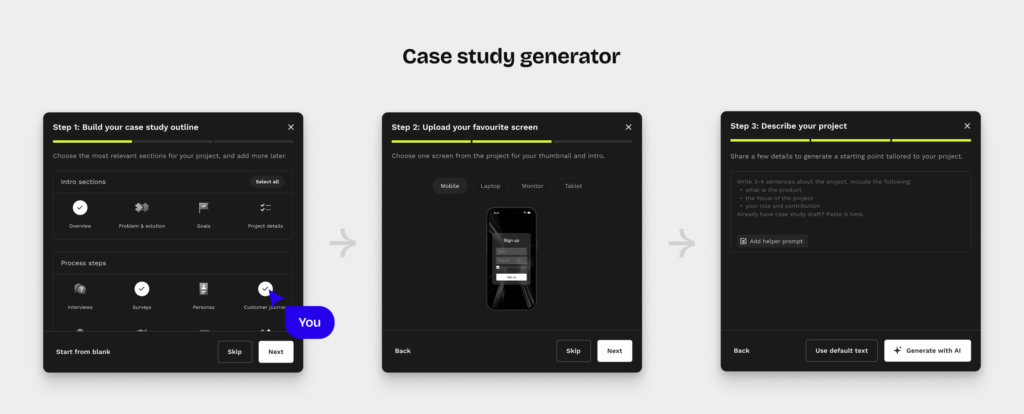
Case study generator
You can start by using a suggested prompt or writing your own from scratch. Based on your input, the selected case study sections, and any uploaded images, the AI generates a complete draft that reflects your project context and decisions. The draft is fully editable, so you can refine structure, expand explanations, or rewrite sections to ensure everything accurately represents your work.
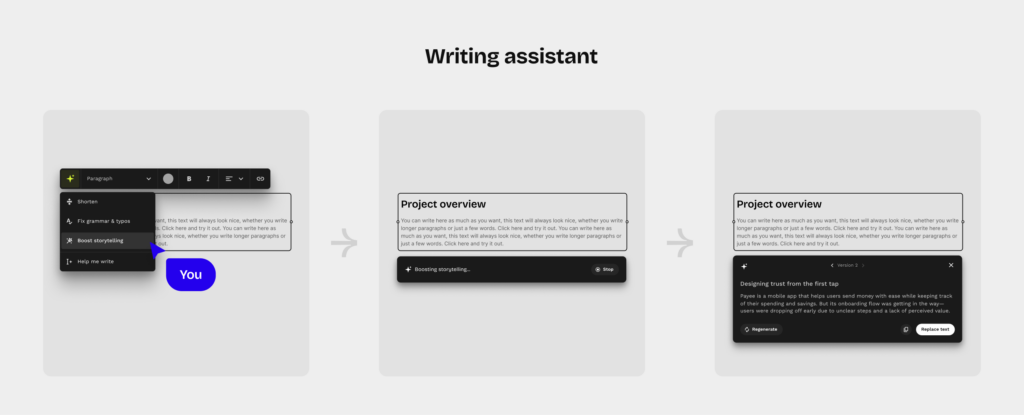
Text selection and AI enchant
You can select any part of your text and apply targeted AI actions such as shortening, fixing grammar and typos, improving clarity, or getting help continuing a section. This allows you to improve specific parts of your case study without rewriting entire sections or losing your original intent.
Version control through regeneration
With the regenerate option, you can create alternative versions of the same section while keeping the original text intact. This makes it easier to test different ways of explaining decisions, framing outcomes, or adjusting emphasis, and then choose the version that communicates your thinking most clearly.
Headline improvement
You can also refine section titles using headline improvement. This helps you make headlines clearer and more scannable, so key points are easier to grasp during fast portfolio reviews.
Why this matters in practice
Together, these features support an iterative writing process that mirrors how you actually work as a UX designer. You can explore variations, compare explanations, and progressively improve how your decisions are communicated, without outsourcing authorship or intent to AI.
Turning AI drafts into real, hireable case studies
An AI-generated draft is only the starting point. What makes a UX case study hireable is not the presence of AI, but the clarity of thinking it reveals. UXfolio’s AI is most effective when it’s used to shape, refine, and strengthen your story so reviewers can quickly understand how you approach problems and make decisions. At some point, most designers realize that their portfolio doesn’t fail because the work is weak, but because the story isn’t clear.
Improving structure and storytelling
Strong UX case studies follow a clear narrative arc: problem, context, approach, decisions, and outcomes. AI drafts help surface this structure early, but the real value comes from refining it. UXfolio’s workflow makes it easy to reorganize sections, adjust emphasis, and ensure that each part of the story serves a purpose.
Instead of long, uninterrupted blocks of text, well-structured case studies guide the reader through your process. Clear sectioning allows hiring managers to scan efficiently while still understanding the logic behind your work. This balance between readability and depth is what separates a generic portfolio piece from a compelling one.
Highlighting your decisions and impact
Hiring managers care less about tools and deliverables, and more about why choices were made. UXfolio’s AI encourages designers to articulate reasoning why a specific method was chosen, how constraints influenced decisions, and what changed as a result of user feedback.
This shift from description to reflection is critical. By revisiting AI-generated drafts and strengthening decision points, designers can transform surface-level narratives into evidence of problem-solving ability. The goal is not to impress with complexity, but to demonstrate thoughtful, intentional design.
Making your case studies easy to review
UX portfolios are often reviewed quickly. Case studies that are hard to scan or lack clarity are likely to be skipped, regardless of the quality of the work behind them. UXfolio helps designers present their case studies in a format that supports fast evaluation clear headings, logical flow, and focused content.
When AI is used to support clarity rather than replace thinking, it becomes a practical tool for communication. The end result is a case study that feels confident, coherent, and review-friendly qualities that directly impact how your work is perceived.

Common UX case study mistakes AI cannot fix
Even with AI support, many UX case studies fail for the same underlying reasons. The problem is not the tool, but how designers think about their portfolio content. Understanding these common mistakes helps clarify where AI can help, and where human judgment remains essential.
Focusing on activities instead of decisions
One of the most frequent issues is describing what was done without explaining why it was done. Designers list workshops, wireframes, and usability tests, but leave out the reasoning behind key choices. AI can help structure text, but it cannot infer intent if the designer does not articulate it.
Overloading the case study with deliverables
Screens and prototypes feel concrete, which makes them tempting to showcase. However, too many visuals without context force reviewers to guess what matters. AI cannot decide which artifacts best demonstrate problem solving. That prioritization requires understanding how hiring managers evaluate UX work.
Explaining UX theory instead of applying it
Another common mistake is over explaining methods at a theoretical level. Case studies that read like UX textbooks rarely communicate competence. AI can generate clean explanations, but it cannot replace the need to show how methods influenced real decisions in a specific project.
Avoiding constraints and trade-offs
Many designers present their projects as smooth, linear success stories. In reality, strong UX work is shaped by constraints, limitations, and compromises. AI cannot surface these moments unless the designer is willing to reflect on them. Yet these are often the strongest signals of senior thinking.
Lack of clear ownership
When case studies use vague language, it becomes unclear what the designer actually owned. AI-generated text often amplifies this problem if not carefully reviewed. Hiring managers want to see responsibility, not just participation. Clarifying ownership is a human task, not an automated one.
Recognizing these pitfalls reframes the role of AI. The goal is not to generate perfect case studies automatically, but to use AI as a support system that helps designers focus on what truly matters.
What hiring managers look for in AI-assisted UX case studies
Hiring managers are increasingly aware that designers use AI tools but awareness doesn’t equal concern. What matters is whether a case study communicates real UX thinking, ownership, and impact. AI-assisted case studies fail when they obscure authorship or flatten decision-making, and succeed when they enhance clarity without replacing intent.
Clarity of thinking over polished language
From a hiring perspective, clear thinking consistently outweighs eloquent wording. Reviewers scan UX case studies for logical flow: how the problem was framed, which constraints mattered, and how decisions evolved. AI-assisted drafts that focus too much on “nice phrasing” often miss these signals.
Well-structured UX case studies make reasoning visible. They show why certain paths were taken and why others were not. When AI is used to support this structure rather than to embellish language it becomes an asset instead of a liability.
Evidence of ownership and decision-making
One of the biggest red flags for hiring managers is ambiguity around ownership. Generic AI-generated case studies often describe actions without clearly stating who made decisions or what role the designer played. This creates uncertainty and weakens credibility.
UXfolio’s AI workflow helps avoid this by encouraging explicit articulation of decisions, trade-offs, and outcomes. Case studies that clearly show ownership of what you chose, what you changed, what you learned are far more likely to be perceived as authentic and hireable.
Scannability and review efficiency
In real hiring scenarios, UX case studies are rarely read linearly. Reviewers scan headings, skim sections, and jump between artifacts. AI-assisted case studies that ignore this reality risk hiding important insights in dense paragraphs.
Hiring managers value portfolios that respect their time. Clear sectioning, concise explanations, and visible decision points make a case study easier to evaluate. When AI supports this level of scannability, it directly contributes to better portfolio performance.

Tips for getting the most out of UXfolio’s AI
UXfolio’s AI case study generator works best when it’s treated as part of your design process not as a shortcut to finished content. By approaching it with intention, designers can use AI to strengthen clarity, improve structure, and communicate their thinking more effectively.
Using AI as a guide, not a shortcut
AI is most valuable when it helps you ask better questions about your own work. Instead of accepting generated text as final, use it to identify gaps: where context is missing, where decisions need explanation, or where outcomes could be clearer. UXfolio’s AI is designed to support this reflective process rather than replace it.
For junior designers, this approach reinforces good habits. It shifts the focus from “filling a template” to explaining reasoning, something hiring managers consistently look for. Treating AI as a guide keeps the case study authentic and grounded in real experience.
Iterating your case study with intention
Strong UX case studies rarely emerge in one pass. UXfolio’s integrated workflow encourages iteration, making it easier to refine structure and emphasis over time. Designers can revisit drafts after feedback, adjust narratives, and clarify key moments in the process.
This iterative approach mirrors real UX work. Just as designs evolve through testing and review, case studies benefit from gradual improvement. Using AI to support iteration helps maintain momentum without sacrificing depth or accuracy.
Showcasing your UX process confidently
Confidence in a UX portfolio doesn’t come from polished language, it comes from clarity. When your case study clearly communicates what you did, why you did it, and what you learned, it becomes easier for reviewers to trust your work. UXfolio’s AI supports this by keeping the focus on process and decision-making.
By combining AI guidance with your own judgment, you can create case studies that feel both structured and personal. The result is a portfolio that communicates competence without overstatement exactly what hiring managers want to see.
Frequently Asked Questions (FAQ)
Is using an AI UX case study generator acceptable in a UX portfolio?
Yes, when used thoughtfully. Hiring managers generally don’t mind AI-assisted writing as long as the case study clearly reflects your own thinking, decisions, and problem-solving process. The issue is not whether AI was used, but how. Tools like UXfolio’s AI case study generator are designed to support structure and clarity, not to fabricate experience or replace your reasoning.
How is a UX-focused AI case study generator different from generic AI tools?
Generic AI case study generators are built for broad use cases across industries. UX-focused tools, like UXfolio’s AI, are aligned with UX workflows and portfolio expectations. They emphasize process, decision-making, and iteration elements that hiring managers actively look for when reviewing UX portfolios.
Can junior UX designers use AI without hurting their credibility?
Absolutely. In fact, AI can be especially helpful for junior designers when it’s used as a learning and structuring tool. UXfolio’s AI helps highlight where explanation is needed and how to communicate UX decisions clearly, which can strengthen a junior designer’s portfolio.
Does UXfolio’s AI create fake or generic case studies?
No. UXfolio’s AI does not generate fictional projects or generic success stories. It works with your real projects and supports you in articulating them more clearly. The content remains grounded in your actual work, ensuring authenticity and credibility.
What makes a UX case study “hireable”?
Hireable UX case studies are easy to scan, clearly structured, and focused on decision-making and impact. They explain why choices were made, not just what was delivered. UXfolio’s AI helps designers reach this level of clarity by supporting structure, reflection, and iteration.